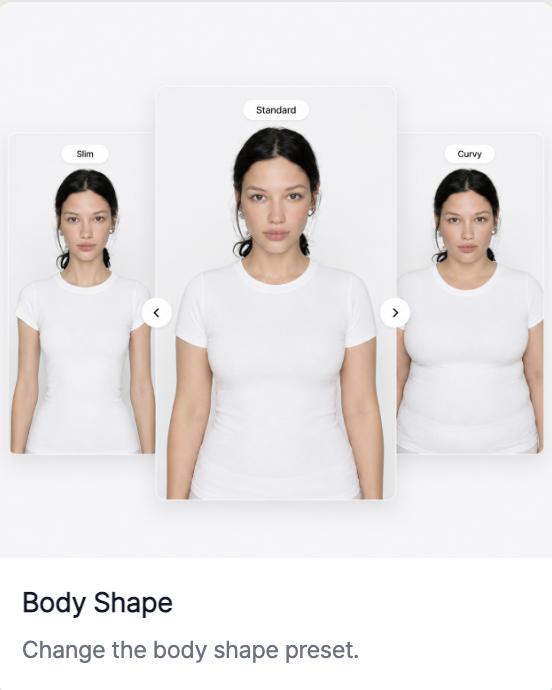
RealSnap Body Shape Adjustment feature lets you adjust the model’s overall silhouette and proportions.
It’s useful when you want to refine the model’s body shape in the direction your brand wants so the product fit looks more natural.
The product fit may be good, but the body shape may not match your brand
In fashion images, the model’s body shape has a major impact on how the product is presented.Even with the same clothing, the fit and silhouette can look different depending on body shape, so the impression may feel slightly different from what your brand wants.
In this case, instead of recreating the image from scratch, adjust only the body shape to refine the result closer to what you want while maintaining the product fit.
You can refine the overall silhouette by adjusting body proportions
The body shape adjustment feature can be used to make the model’s silhouette look slimmer or adjust the overall proportions to match your brand mood.
For example, it’s useful when you want to create a more polished lookbook impression, or when you want to balance the overall look so the product fit appears more natural.It’s especially well suited for product images where silhouette matters, such as tops, bottoms, dresses, and outerwear.
How to use
- Select the AI model cut you want to edit.
- In the Snap tools, select the Change Body Shape feature.
- Set the desired body shape direction.
- Click Create to check the result.
- If needed, continue editing with other features.
💡 Things to note
If you use it for sales images, make sure the actual product fit and silhouette have not changed excessively after adjusting the body shape.It’s especially a good idea to review whether the garment length, wrinkles, and fit depiction look different from the original.
Conclusion
The body shape adjustment feature is great to use when you like the overall image mood but want to slightly refine only the model’s silhouette.You can refine it into a model cut that shows the product fit more naturally.