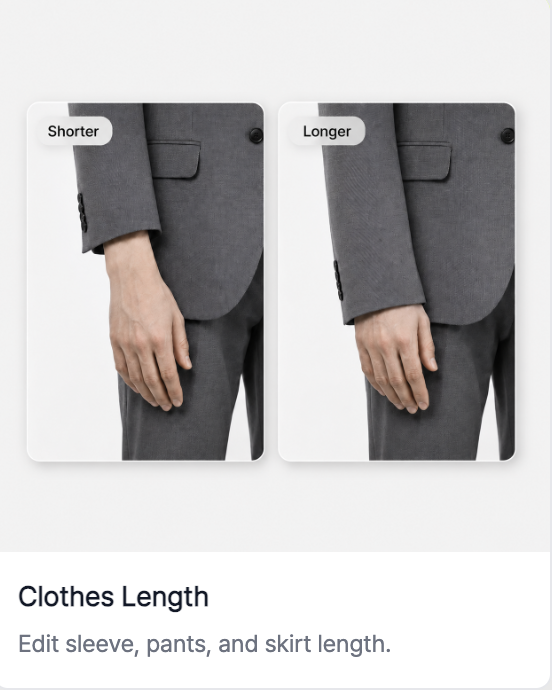
RealSnap Clothing Length Adjustment feature lets you refine the length of tops, bottoms, dresses, and outerwear more naturally.
It’s useful when you want to adjust only the length while keeping the overall outfit the same.
Even slightly awkward length can change the impression of a product
In apparel images, length has a big impact on the product’s impression.If a dress length feels off, outerwear sleeves look awkward, or bottom length differs from the product image, the overall image may still look fine but feel unnatural.
In these cases, it’s much more efficient to adjust only the clothing length rather than recreate the entire image.
1. You can refine the length of tops, bottoms, dresses, and outerwear
- Presets
The clothing length feature is useful for matching a product’s length more naturally. For example, you can use it when pants need to look slightly longer, or when a shorter top length would feel closer to the actual product.
It’s especially useful for images where product fit and length are important, such as detail pages or lookbooks.
- Fine Adjust
Also, try-on shots with awkward length can be edited more precisely with Fine Adjust without reshooting.
First, choose whether it’s a top or bottom by selecting Top or Bottom, then click the Analyze button to analyze the clothing area in the image and display a guide line for adjusting the length.
You can then move the displayed line yourself to make the garment shorter or longer, allowing you to fine-tune the fit when a top hem looks awkwardly long or the length of pants or a skirt feels unclear.
It’s a useful feature when you want to keep the overall mood of the image while adjusting the length to better match the actual product.
How to use
- Select the AI model shot you want to edit.
- In the Snap tool, select the Clothing Length feature.
- Choose the desired length direction.
- Click Generate to check the result.
- Save the final result or make additional edits.
💡 Things to note
When adjusting clothing length, make sure it does not appear different from the actual product length.
It’s best to zoom in and check that the sleeves, hem, waistline, and pant length connect naturally.
Conclusion
The clothing length adjustment feature is great to use when you like the overall style but the length feels slightly off.You can refine the result to show the product fit more naturally and accurately.